 IT Security Team Tech Site

 Review an IpSec policy
To review the settings of an IpSec policy on windows 2003 go to:
Start / Run / Type "MMC" and hit enter
Click file Add/Remove snap-in, click add, click "IP Security Policy Management" and click add, click local computer and finish. Close the add snap-in window. Click OK to close the add/remove snap-in window.
You should have a window like the one shown on the left.
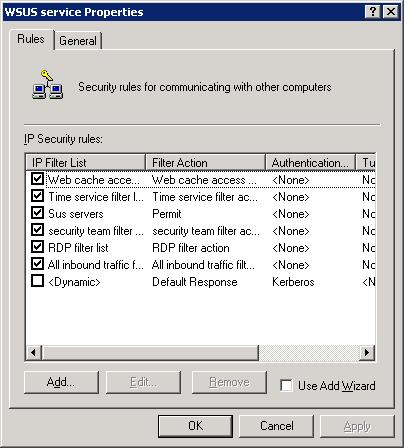
Look to see what policy is assigned, in this case it is the WSUS server policy, right click and click properties
You should now have a screen showing each of the filters that are active, show in the second box in the left.
Here you can see a list of all the filters your computer is using, since we can see that the "All outbound traffic" filter is active, if another filter does not let the traffic out or in it will be blocked.
Select a filter in our case we will select the Time service filter list and click edit. You will now see a list of filters again this shows the filter you are editing along with other options click edit a second time.
Here you will see the actual rules that are used by the computer when deciding if it allow traffic or not. Showmen here in pic 3 on the left
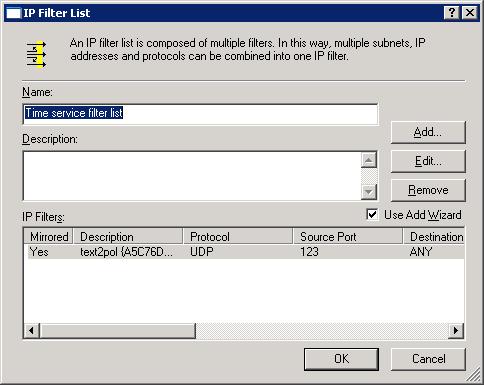 The bottom line here is the most important one, lets go through the filter for the time server
Mirrored / This means that the policy is reversible so that the communication is both ways e.g. send and reply
Description / The name it was given when it was set up
Protocol / The type of protocol we are using e.g. TCP, UDP or ICMP
Source port / The port it is coming from in this case 123 the time port ( remember this will also be reversed as this is a mirrored policy)
Destination port / the port it is sending to in this case all ports (remember this will also be reversed as this is a mirrored policy)
The rest of the information is defining address information for the computer or network to be communicated with.
This can be edited and added to with the buttons on the right.
You will need to review many of there rule lists before you can have a good understanding of what the policy does as a whole.
Remember that the security team can help you with these policies so if you are unsure ask us rather than let your server be unsecured.