 IT Security Team Tech Site

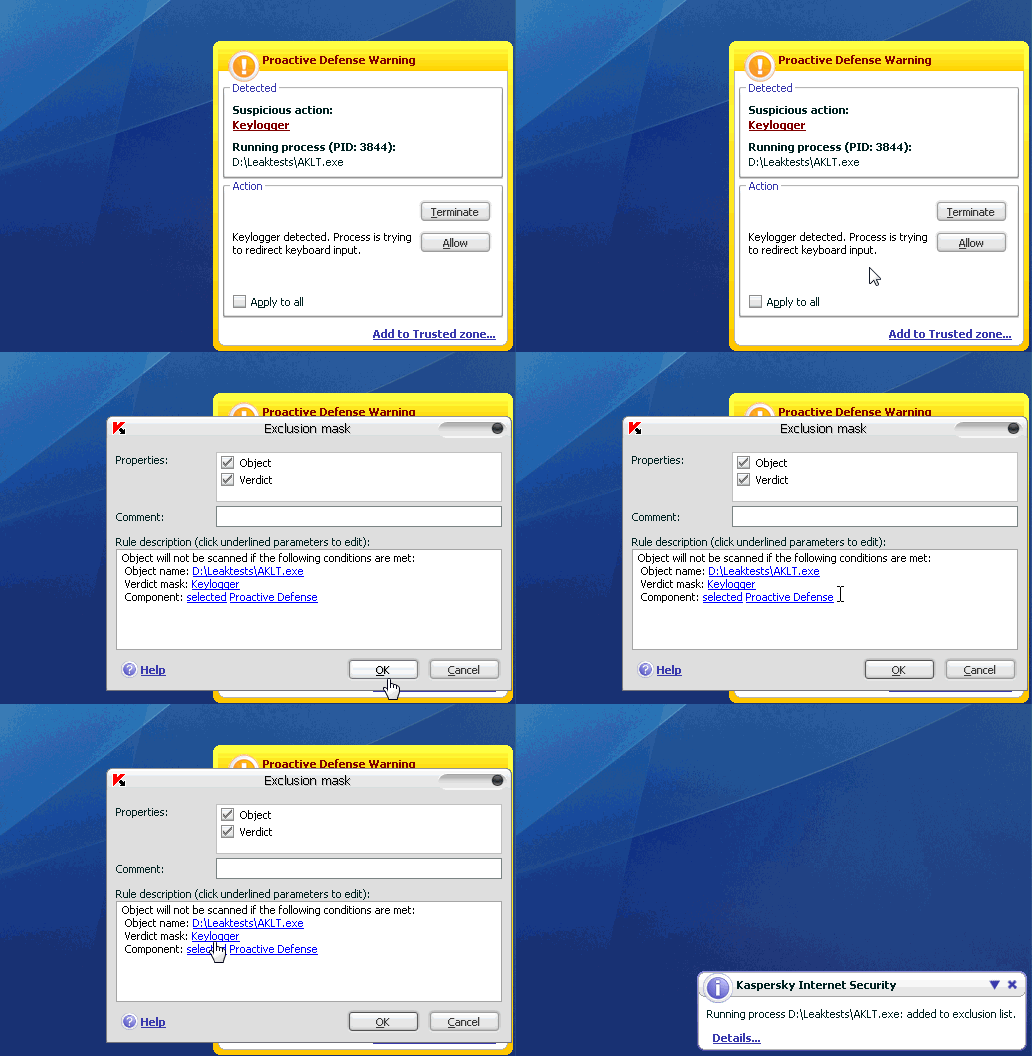 Requesting a configuration change in Kaspersky
If you see a pop up box like this one on the left it is because a program on your computer is trying to change something on your computer. This could be for a legitimate application or a virus. We can take a look at the information provided to us by Kaspersky to find out.
Take a look at the Running processes
This tells you the location and the name of the program that is trying to perform an action In this case it is "AKLT.exe" in the "Leaktest" directory on the "D" drive.
Next take a look at the "Suspicious action"
In this case the suspicious action is a keylogger
Below in the "Action" box you can see a description of what is happening on your computer.
In our example of a keylogger we will need to ask ourselves is this something that i am trying to do or is it something that I do not expect. If this just popped up while we were answering e-mail it would be considered a problem and your should contact the insrv helpdesk immediately. However if we are installing disability software that captures key inputs then this may be perfectly acceptable.
It is critical that you read the message carefully and do NOT click anything without considering what Kaspersky is telling you.
If you trust the application and will be using it often you can click "Add to trusted zone"
This will then pop up a box as showmen in the animation to the left showing you the information to be trusted. If this is a widely used application you can open a help desk call and request it be added to the standard list of trusted applications.