 IT Security Team Tech Site

 Processes
Here we can take the values from the netstat command and find out what the PID represents.
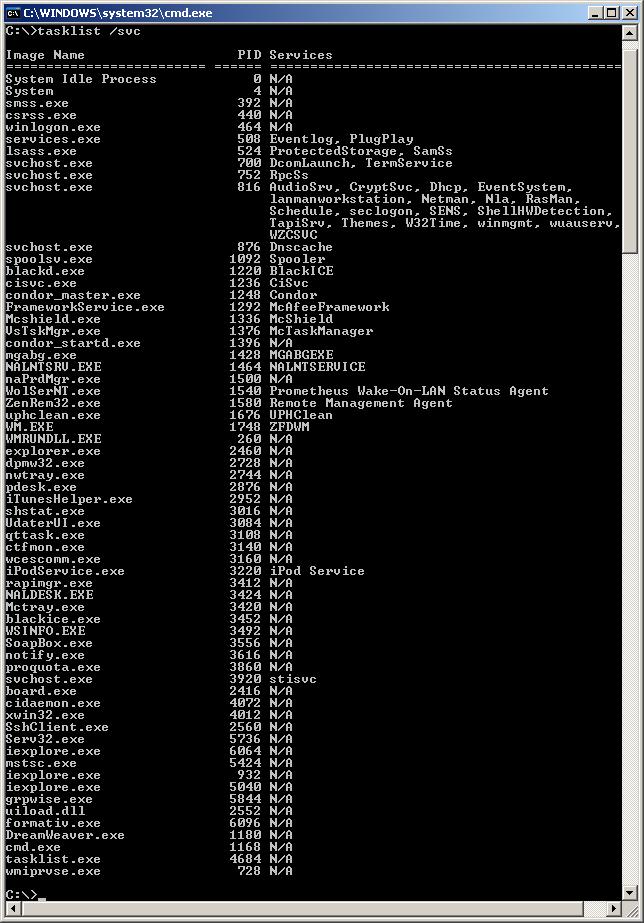
If you open an new command prompt and type "tasklist /svc"
Windows will display all of the currently running applications and there PID or Process IDentification numbers.
So if we had seen a suspicious port and received a PID value of 1092 we can look this up and see that is was opened by the Spoolsv.exe which we can then look up. In this case spooler is part of the printer drivers and is a normal application to be opening ports.
If in the case of a PID value of 816 we can see svchost.exe is returned. Svchost is a core part of the windows operating system that will run applications as services at the start up of the computer. These services are hidden from the user under normally conditions as there are not to interact with the user directly. these services are things like DHCP for getting network addresses and DNS for name translation. Both of these are accessed by internet explorer and not directly by the user.
This hiding quality of services is often used by viruses to keep them selves hidden, however with the tasklist /svc command we can see them.
This will give you a chance to find out what is running and what is opening ports on your computer. as you become more familiar with the services in windows you will more quickly spot when something is not quite right.
If at any point you are unsure of what to do STOP and contact InSrv.