 IT Security Team Tech Site

 Detecting viruses using the network
To look at what the windows is doing on the network we need to open up a command prompt by clicking start run and typing"CMD"
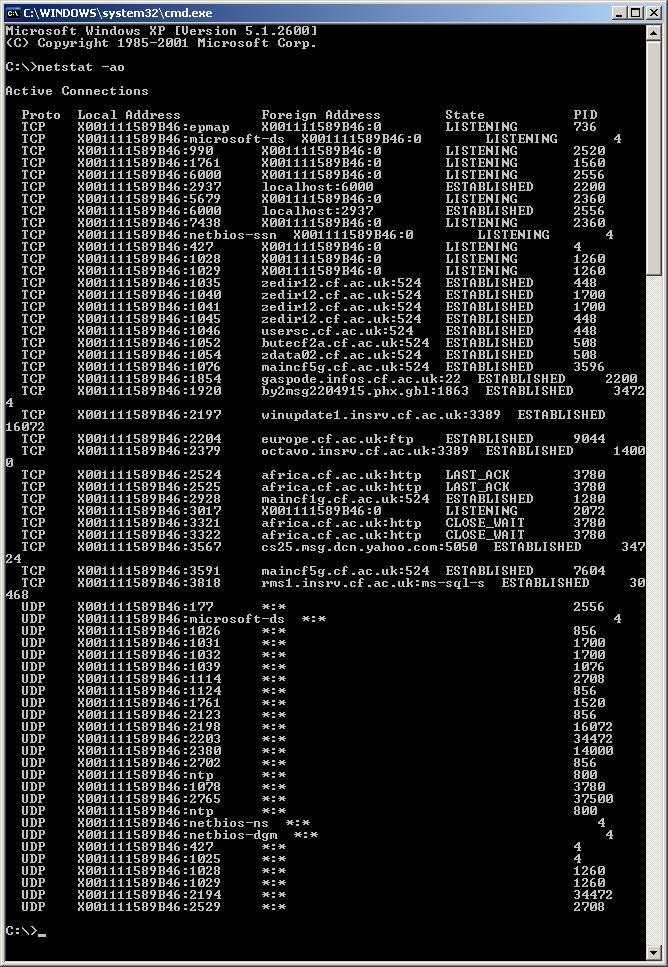
At the command prompt we can type "netstat -ao"
The netstat command (network status) will now show you all ports open on your pc and tell you what is connected to your computer.
Here we can see under local address the name of my pc (in this case "X001111589B46" and the ports that are open.
We can look for any ports that look suspicious and see what application has opened the port. The application is shown by the PID value on the same line.
E.G. on the third line down we can see my computer has port 990 open and this has been opened by application 2520.
We can then use this information to lookup the PID and find out the name of the application in the next section.