 IT Security Team Tech Site

If your PA VPN client (Global Protect) will not connect, you may need to reinstall your encryption certificate.
To do this open Internet explorer
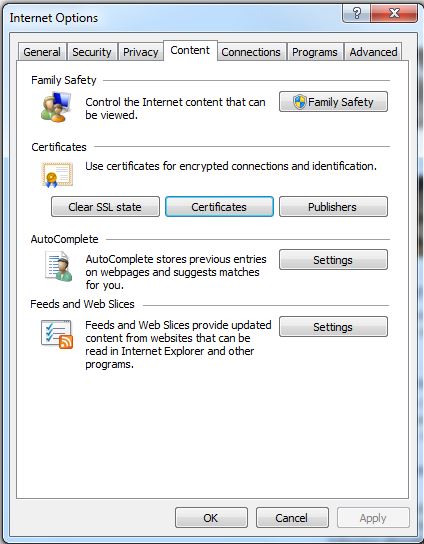
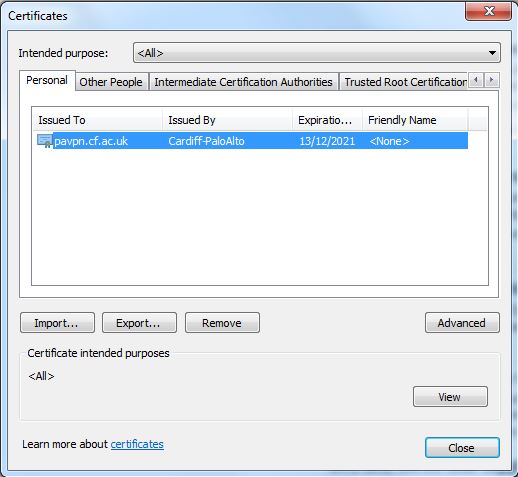
Click on Certificates. You should see a "pavpn.cf.ac.uk" Certificate. Please remove this by clicking the remove button.
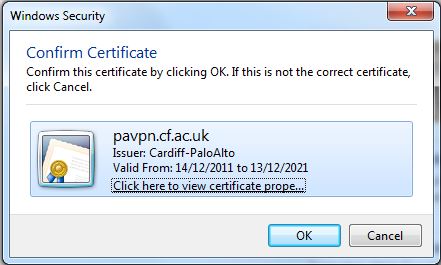
You now need to visit Https://pavpn.cf.ac.uk. You should now be asked to "confirm the certificate". Click OK to install.
You will now be presented with the "Cardiff University VPN" Login page. You do not need to login to this page, but you can right click on the "Global Protect Icon"  and click open.
Click View, Advanced, Settings. Then confirm your username and password. Also ensure that the Portal has been filled in as "pavpn.cf.ac.uk"
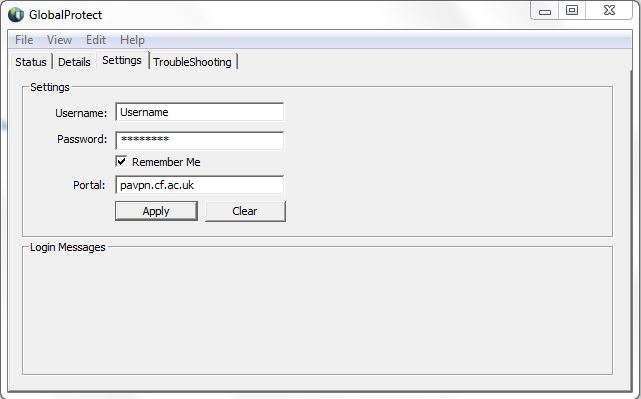
You should now have access to the VPN. If you have any problems please log a a call with the service desk.